

- Blog >
- How Do Streaming Services Detect VPNs?
How Do Streaming Services Detect VPNs?



Streaming platforms check your IP address against databases of known VPN servers and flag connections that don't look like they're coming from an ordinary residential connection. That's the short version.
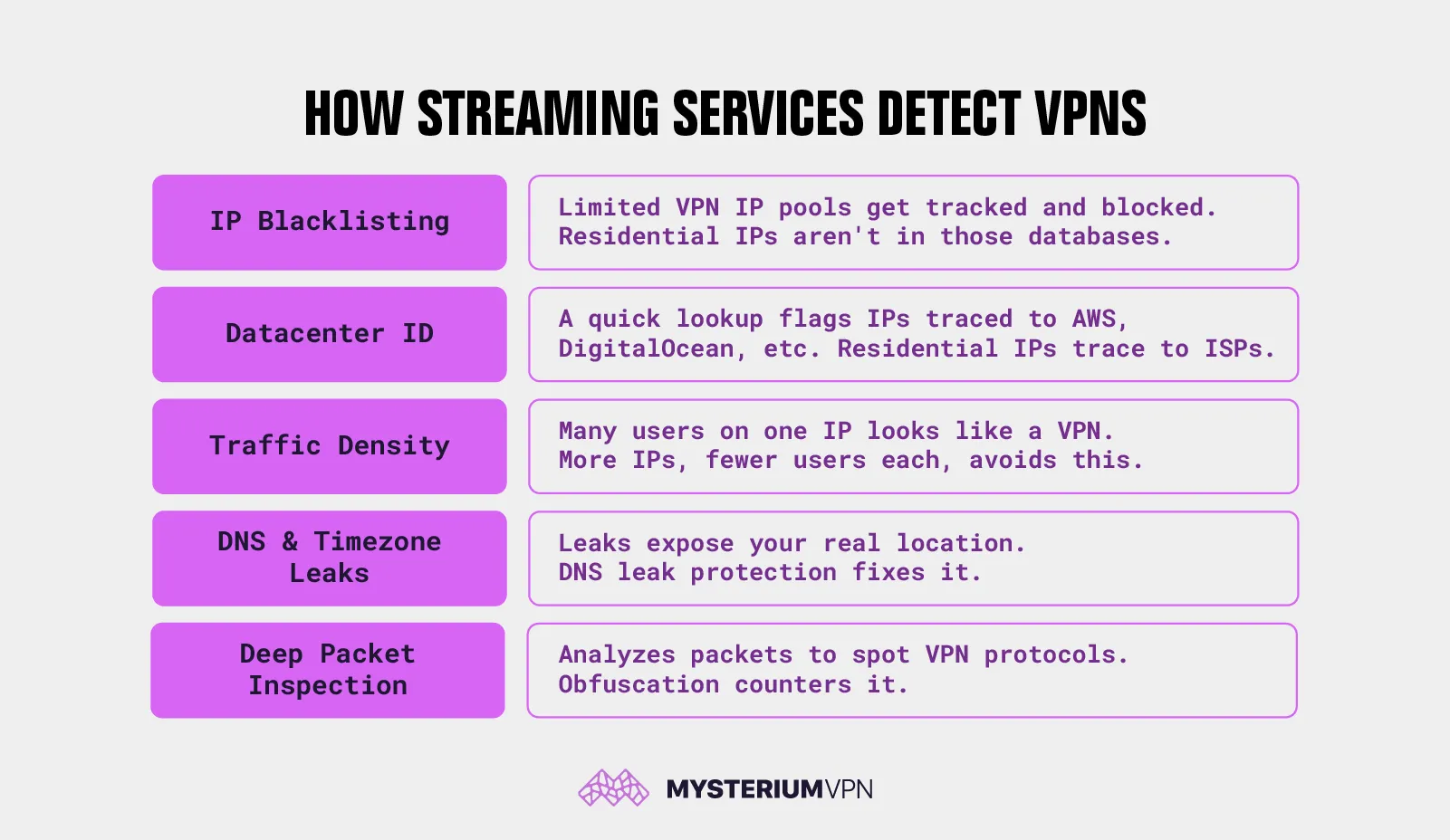
In practice, streaming services combine five separate detection methods to catch VPN traffic: IP blacklisting, datacenter IP identification, traffic density monitoring, DNS and timezone leaks, and deep packet inspection. Take a look at the bigger picture behind VPN detection here.
Understanding how each one works also explains why a residential VPN is harder to flag than the datacenter-based VPNs most providers run, and why the same VPN can work on one platform and get caught on another.
How Streaming Services Detect VPNs: 5 Methods
1. IP Address Blacklisting
VPN providers work with a limited pool of IP addresses, and streaming services maintain databases of IPs known to belong to VPN servers, then block connections from any address on that list. A residential IP is harder to blacklist this way because it's assigned by an ISP to a real household, distributed among millions of other addresses, and never entered into a VPN provider's database in the first place. For more on what a residential IP address is, it's worth understanding the distinction before comparing providers.
2. Datacenter IP Identification
Every IP address is registered to an organization, and that registration is publicly searchable through a WHOIS or regional internet registry (RIR) lookup. If an IP traces back to a known hosting provider, AWS or DigitalOcean, for example, it gets flagged immediately, since ordinary households don't host their internet connection through a cloud provider. Residential IPs trace back to ISPs instead, which is a fundamentally different registration record than a server rented by the hour.
3. Traffic Density Monitoring
Thousands of VPN users can end up sharing the same handful of IP addresses, and a single address generating an unusually high volume of connections is itself a fingerprint; real households simply don't produce that kind of traffic pattern. Decentralized residential networks structurally avoid this by spreading users across a much larger pool of IPs, so fewer people share any single address at once. That's a structural advantage, not a guarantee that any specific IP stays under the radar indefinitely.
4. DNS and Timezone Leaks
A DNS leak happens when your device routes DNS requests through your local network instead of the VPN's encrypted tunnel, exposing your real location even while the rest of your traffic is hidden. A timezone mismatch between your device settings and your apparent IP location can raise the same flag. The practical fix is straightforward: use a VPN with DNS leak protection enabled by default. This is a configuration issue, not something inherent to VPN technology itself, so it's fixable rather than a fundamental weakness.
5. Deep Packet Inspection (DPI)
Deep packet inspection is a method of analyzing the structure and metadata of encrypted data packets to identify recognizable patterns, including the packet structure specific to VPN protocols like OpenVPN or WireGuard. Even without decrypting the contents, DPI can often tell that a connection is running a VPN protocol at all. Obfuscation, sometimes marketed under other names, counters this by scrambling that packet metadata so the connection resembles ordinary HTTPS traffic rather than a recognizable VPN handshake.
How Netflix Detects VPNs – and Why Others Do the Same
Netflix is generally the most aggressive streaming platform about VPN detection, combining IP blacklisting and datacenter identification to catch the majority of VPN traffic before it reaches a title page.
Anyone looking specifically at a VPN for Netflix should expect this to be the toughest platform to work with, not the easiest. BBC iPlayer enforces UK-only access primarily through IP geolocation, since its licensing is tied specifically to being inside the UK.
Amazon Prime's enforcement varies by title depending on the underlying licensing agreement for that specific piece of content, which is why VPN detection can feel inconsistent on Prime compared to Netflix.
ESPN takes a similar location-based approach for blackout restrictions, which is why so many people specifically search for how to bypass ESPN blackout rules rather than a generic VPN fix. The underlying detection methods are largely the same across platforms; what differs is how aggressively each one acts on what it finds and how much content-by-content variation exists in enforcement.
Why Residential IPs Are Harder for Streaming Services to Flag
Residential IPs are assigned by ISPs to real households, so they don't appear in VPN databases, don't trace back to a datacenter, and aren't shared by thousands of users. Each of these properties addresses a different detection method covered above, rather than a single trick solving everything at once. That’s worth understanding, since it explains why residential IPs aren't just "a better VPN"; they're structurally different from the ground up. Because residential IPs trace to ISPs, not hosting providers, they pass the datacenter identification checks that flag most VPN traffic before it even reaches a blacklist.
- Blacklisting: Residential IPs generally aren't in VPN provider databases to begin with, since they were never assigned to a VPN server in the first place
- Datacenter identification: Residential IPs trace to ISPs, not hosting companies, on a WHOIS lookup, which is a fundamentally different record than a rented server
- Traffic density: A larger, distributed pool of residential IPs means fewer users share any single address, so no one IP looks like a traffic hub
None of this means residential IPs are undetectable – they can appear more similar to residential traffic, which may reduce the chance of triggering VPN-specific blocks. Availability depends on the platform, location, IP reputation, and usage pattern, and a platform that tightens its detection tomorrow could change the picture.
For a deeper look at residential vs. datacenter VPN infrastructure, the distinction comes down to where the exit IP is registered, not which protocol is used.
How Mysterium VPN's Residential Network Addresses Each Method
Mysterium VPN routes traffic through a decentralized network of node operators sharing real residential connections, drawing from 7,500+ residential IPs across 100+ countries. Exit IPs are ISP-assigned residential addresses rather than datacenter ranges, which is what addresses the blacklisting and datacenter-identification methods described above.
Spreading traffic across that many IPs also reduces how many users share any single address at once, addressing the traffic density method the same way, since no single node is carrying the volume a small centralized VPN pool would.
None of this is a claim that Mysterium bypasses Netflix or any other platform; it's an architectural difference that may reduce detection risk, not a guarantee, and it's worth treating it that way rather than as a silver bullet.
If what you're after is a residential VPN for streaming specifically, this is the architecture behind it. It's easy enough to get Mysterium VPN and put it to the test yourself.
If you're streaming across multiple devices — Smart TVs, consoles, or anything that can't run a VPN app directly — you can protect all streaming devices with a router VPN instead of setting up each one individually.
None of the methods above is unique to any one platform, and none of them is fully solved by any single feature. Understanding how detection actually works is what makes it possible to evaluate a residential VPN honestly, rather than taking a provider's marketing at face value.


Reclaim the internet that took you at your word!
Get Mysterium VPN
Frequently Asked Questions
Gintarė is a cybersecurity writer at Mysterium VPN, where she explores online privacy, VPN technology, and the latest digital threats in editorial pieces. With hands-on experience researching and writing about data protection and digital freedom, Gintarė makes complex security topics accessible and actionable.
Related Articles
.png)